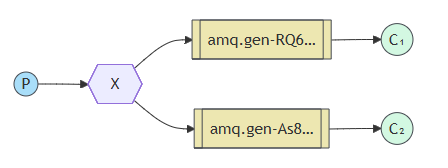
一、交换机 1、 交换机的作用 在 RabbitMQ 的发布/订阅模式下,其核心思想是:生产者绝不会直接将消息发送到队列中。实际上,很多时候生产者甚至都不知道消息是否会送达任何队列。 相反,生产者只能向一个交换机发送消息。交换机是一个非常简单的概念。一方面,它接收来自生产者的消息;另一方面,它将这些消息推送到队列中。交换机必须清楚地知道如何处理它接收到的消息。该消息是否应添加到特定的队列中?是否应添加到多个队列中?还是应该将其丢弃?这些规则由交换机的类型来定义。
交换机有:direct、topic、headers、fanout 类型
2、广播型交换机 会将消息进行广播,它会将消息分发到所有绑定此交换机的队列
示意图
消息发布 消息发布者无需知道任何队列,只需要将消息交给交换机,由交换机决定传给哪个队列
1
2
3
4
5
6
7
8
9
10
11
12
13
14
15
16
17
18
19
20
21
using RabbitMQ.Client;using System.Text;var factory = new ConnectionFactory { HostName = "localhost" };using var connection = await factory.CreateConnectionAsync();using var channel = await connection.CreateChannelAsync();await channel.ExchangeDeclareAsync(exchange: "logs" , type: ExchangeType.Fanout);var message = GetMessage(args);var body = Encoding.UTF8.GetBytes(message);await channel.BasicPublishAsync(exchange: "logs" , routingKey: string .Empty, body: body);Console.WriteLine($" [x] Sent {message} " ); Console.WriteLine(" Press [enter] to exit." ); Console.ReadLine(); static string GetMessage (string [] args{ return ((args.Length > 0 ) ? string .Join(" " , args) : "info: Hello World!" ); }
消息接收 消息接收者负责创建队列并将队列绑定交换机
channel.QueueDeclareAsync 默认会创建一个名字随机的队列,使用 QueueBindAysnc 将这个队列与交换机绑定
这样就能多个消费者消费同一个消息了
1
2
3
4
5
6
7
8
9
10
11
12
13
14
15
16
17
18
19
20
21
22
23
24
25
26
27
28
29
30
31
using RabbitMQ.Client;using RabbitMQ.Client.Events;using System.Text;var factory = new ConnectionFactory { HostName = "localhost" };using var connection = await factory.CreateConnectionAsync();using var channel = await connection.CreateChannelAsync();await channel.ExchangeDeclareAsync(exchange: "logs" , type: ExchangeType.Fanout); QueueDeclareOk queueDeclareResult = await channel.QueueDeclareAsync(); string queueName = queueDeclareResult.QueueName;await channel.QueueBindAsync(queue: queueName, exchange: "logs" , routingKey: string .Empty);Console.WriteLine(" [*] Waiting for logs." ); var consumer = new AsyncEventingBasicConsumer(channel);consumer.ReceivedAsync += (model, ea) => { byte [] body = ea.Body.ToArray(); var message = Encoding.UTF8.GetString(body); Console.WriteLine($" [x] {message} " ); return Task.CompletedTask; }; await channel.BasicConsumeAsync(queueName, autoAck: true , consumer: consumer);Console.WriteLine(" Press [enter] to exit." ); Console.ReadLine();